
Managing a large set of PDFs becomes easier when the interface is clean, fast, and automated. I created a custom PDF Notes Gallery using HTML, JavaScript, PDF.js, and a small Node.js script. Below is a clear explanation of how each part works and how the whole system fits together.
PDF Gallery (gallery.html)
This is the main page where all PDF notes are displayed in a grid layout.
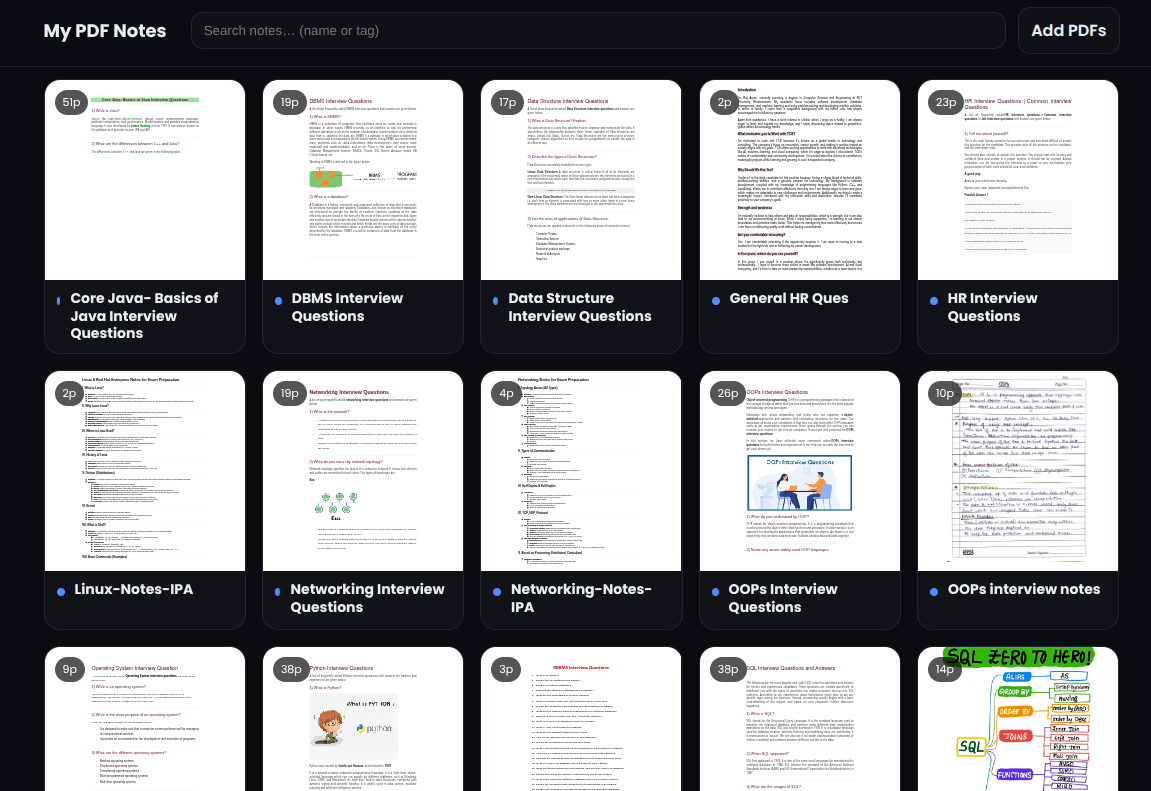
Key Features
- Automatic Thumbnail Generation: PDF.js renders the first page of each PDF into a square canvas preview.
- Page Count and File Size Display: Every card shows the number of pages and file size for quick reference.
- Responsive Card Layout: The grid adjusts automatically based on screen size, from desktop to mobile.
- Search Functionality: Users can filter PDFs by typing the name or tag in the search bar.
- Local File Upload Support: Clicking “Add PDFs” allows users to upload their own PDF files, which get instant previews.
- Smooth User Experience: Lazy loading ensures thumbnails are rendered only when they come into view, improving performance.
How it Works
- A predefined array PDFS contains the list of stored PDF filenames.
- Each file is turned into a card using JavaScript.
- Clicking a card redirects the user to the PDF reader with the selected file passed via URL parameters.
- PDF.js is used to decode and render the preview of page 1.
PDF Reader Page (pdfasweb.html)
This page provides a clean and fullscreen reading experience for any selected PDF.

Key Features
- No Iframes: The PDF is rendered directly onto canvas elements using PDF.js, providing more control and better performance.
- Zoom Control (50-250): Users can adjust zoom levels through a slider.
- Fit-Width Button: Automatically scales the PDF to fit the container width perfectly.
- Lazy Page Rendering: The first page loads quickly, and remaining pages load gradually in the background.
- Dynamic Page Numbering: Each page canvas displays a small tag showing its page number.
- Auto Title Update: The tab title and header text change according to the PDF file name.
- Back to Top Shortcut: A fixed button helps the reader jump back instantly.
How it Works
- The reader extracts ?pdf=filename from the URL.
- PDF.js loads the file, renders page 1, then progressively renders all other pages.
- Zooming re-renders all pages for clarity.
- Fit Width recalculates the scale based on container width.
Automatic PDF List Updater (update-gallery.js)
A Node.js script is provided to automate the updating of the PDF list used in the gallery.
Key Features
- Auto-Scan for PDF Files: It reads all the .pdf files present in the directory.
- Automatic Updating of gallery.html: The script reads gallery.html and replaces the old PDFS array with the new list.
- No Manual Editing Needed: Whenever new PDFs are added or deleted, running the script updates the gallery instantly.
- Simple and Efficient Workflow: No advanced configuration - just run the script and your gallery stays in sync.
How it Works
- Uses Node's fs and path modules.
- Searches the directory for PDF filenames.
- Injects the updated list into the HTML using string replacement.
- Saves the modified gallery file automatically.
Why This System Works Well
- Fully self-hosted - no dependency on external viewers or iframes.
- Fast performance due to lazy loading and direct canvas rendering.
- Clean UI with a dark theme for better readability.
- Works on any device thanks to a fully responsive layout.
- Easy maintenance with the auto-update Node.js script.
This setup is ideal for storing interview notes, study materials, and technical PDF collections - all organized neatly with thumbnails and a smooth PDF reader.
Demo Video
Full Code: GitHub